The practice management app that finally gets it.
Sattva is built for yoga teachers, naturopaths, therapists, Ayurveda practitioners, nutritionists, physiotherapists, and every holistic professional who deserves a tool as mindful as their work.
Offline-first · Live on Google Play · Free for everyone right now · Your data stays on your device
Windows desktop is ready; macOS, Linux, and iOS builds are available on request.
Trusted by professionals across the holistic world
Everything your practice needs. Nothing it doesn't.
Client Management
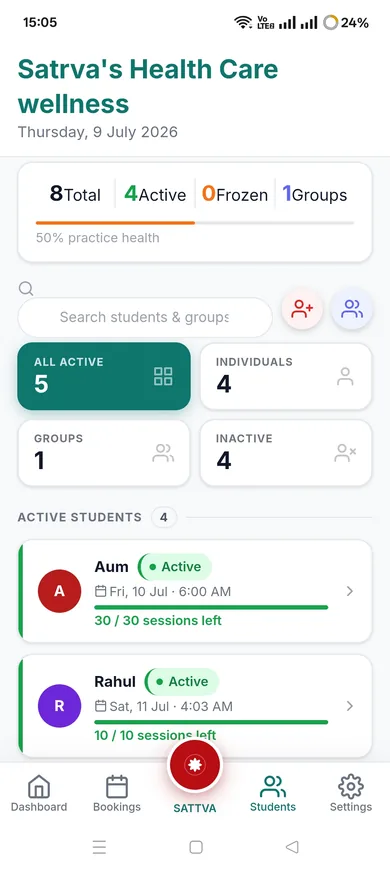
Rich client profiles with health tags, intake forms, session history, notes, and status tracking (Active/Frozen/Inactive).
Flexible Bookings
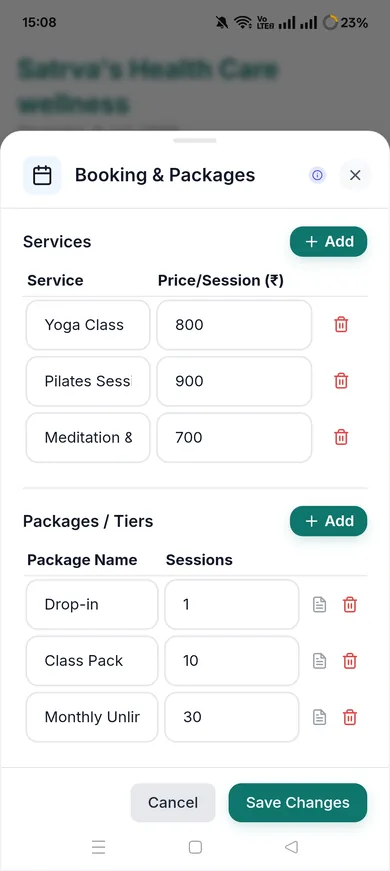
Memberships, custom packages, consultations, pay-per-session — every booking model you use, handled gracefully.
Appointments
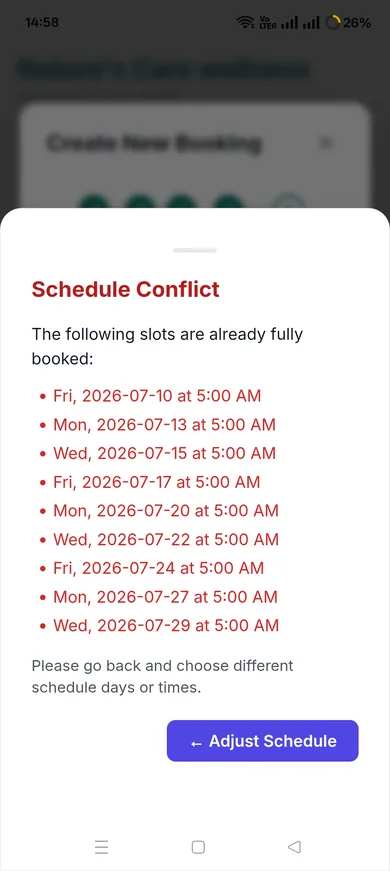
Schedule sessions, mark attendance, track no-shows, and see tomorrow's appointments from your dashboard the moment you open the app.
Group Sessions
Dedicated group management with member lists, group attendance logs, and bulk WhatsApp renewal messages.
AI Assistant
Bring your own key from 6 providers — Groq, Gemini, OpenAI, Claude, DeepSeek, or Kimi K2 — for client insights, daily briefings, and Care Pulse messages.
WhatsApp Integration
Five customizable message templates sent in one tap, plus Smart WhatsApp AI to enhance or rewrite any template while keeping every variable intact.
Professional Invoices
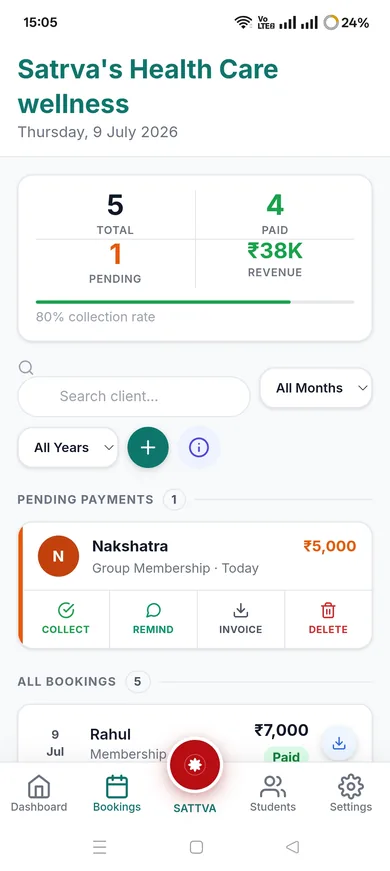
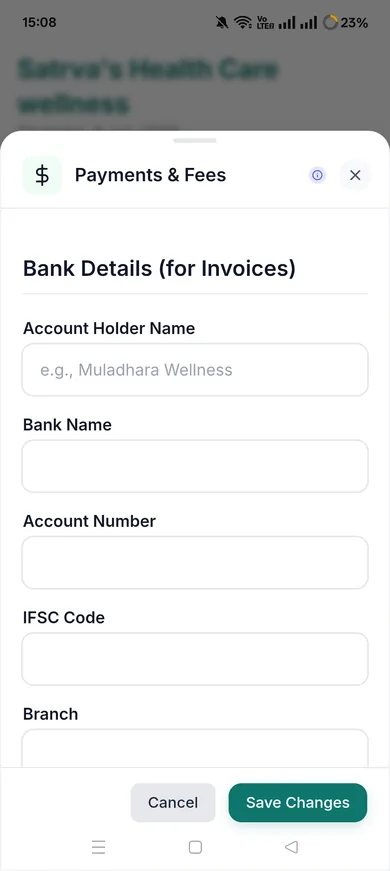
GST-ready PDF invoices and payment receipts, branded to your practice, generated in seconds.
Fully Offline
Every feature works without internet. Your data lives on your device — not in someone else's cloud.
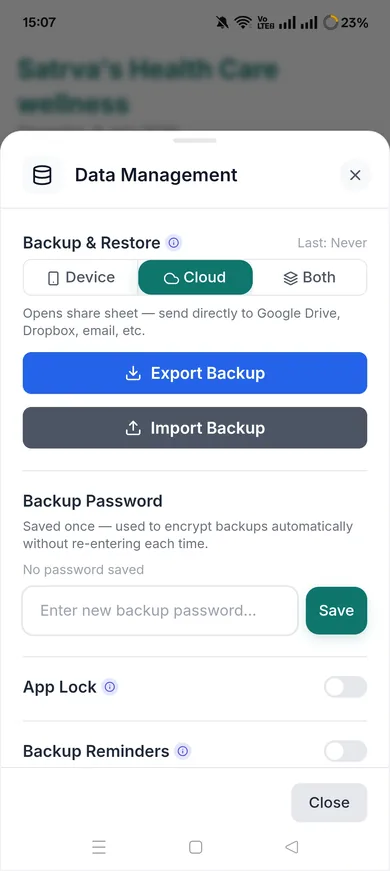
Encrypted Backup
AES-GCM encrypted backups, biometric unlock, optional PIN, and automatic inactivity lock. Your client data is safe.
KAI Sync
Using both Sattva and KAI? Export all paid bookings to KAI accounting with one tap — zero double entry.
Smart Notifications
Automatic reminders for expiring memberships, appointments, and missed sessions — choose your notification window from 5 AM to 10 PM, or turn it off entirely.
Live on Android, More on Request
Native Android app, live on Google Play today. Windows desktop is ready; macOS, Linux, and iOS builds are available on request.
Client care that runs itself.
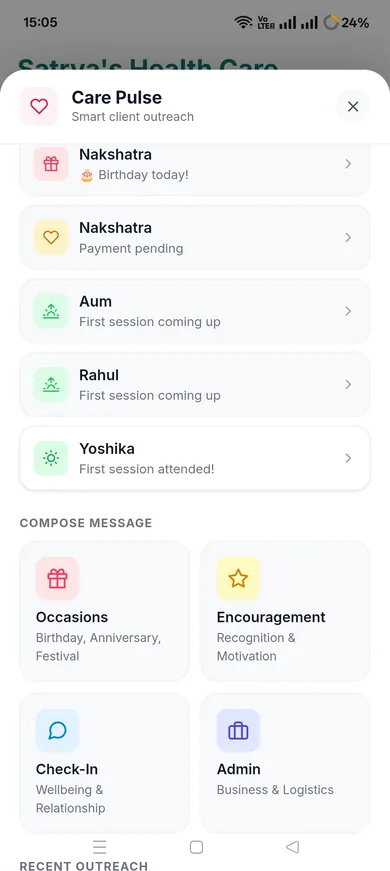
Care Pulse watches your practice data and surfaces exactly who needs a message today — a birthday, a missed session, a goal hit, a renewal due. One tap sends a warm, on-brand WhatsApp message. You never have to remember.
Occasions
- · Birthday Wish
- · 1-Year Anniversary
- · First Session Welcome
- · Top Performer Kudos
- · Streak Milestone
Check-In
- · Absence Check-In
- · Post-Cancellation Care
- · Re-engagement
- · Activation Nudge
Goals
- · Goal Achieved
- · Encouragement
Renewal & Admin
- · Renewal Reminder
- · Package Completed
- · Payment Reminder
- · Session Reminder
Smart Queue — automatically surfaces the right client and message. No digging through client lists.
AI Enhance / Rewrite — polish any message in your voice before it sends, powered by your own AI provider.
7-day suppression — Care Pulse never messages the same client twice in a week. No spam, ever.
Six AI providers. Your key, your choice.
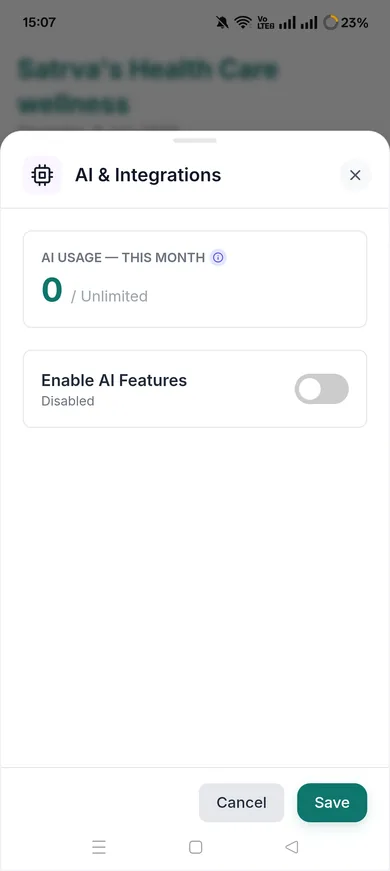
Sattva never holds or bills for AI. You bring your own API key from any provider below — Sattva puts it to work across client insights, daily briefings, and Care Pulse messages.
AI Companion Profile
Set your teaching voice and tone once. Every AI-generated message — Care Pulse, WhatsApp templates, client insights — speaks like you, not like a generic bot.
Smart WhatsApp AI
Enhance or rewrite any WhatsApp template with AI — it preserves every variable ([ClientName], [Date], [Time]) while improving the tone.
Privacy By Design
AI only handles calculations, recommendations, tips, and message wording — never a client's name or identity. Content is pseudonymised with an anonymous ID before it ever leaves your device, so there's no way to trace it back to who it belongs to.
Your clients' data never leaves your device.
No cloud backend. Client and business data is stored only on your device — there is no server for it to sync to.
AES-256-GCM encryption with a device-generated encryption key that never leaves your device — Muladhara never holds it. An optional PIN adds an extra app-lock gate on top.
AI only ever sees pseudonymised, de-identified content — calculations, recommendations, and message wording — never a client's name or which record it belongs to.
No analytics SDK, no trackers, no behavioural profiling. We do not know how you use the app.
Factory reset requires a backup-first confirmation — you can never accidentally wipe data without a safety net.
Optional biometric unlock and PIN lock, with progressive lockout on repeated wrong attempts.
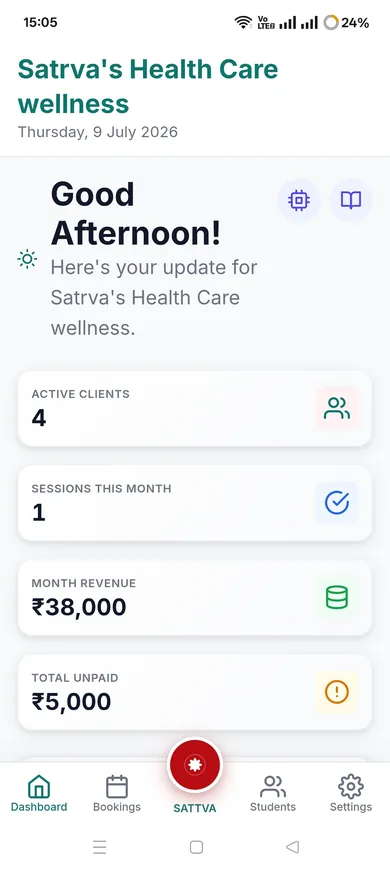
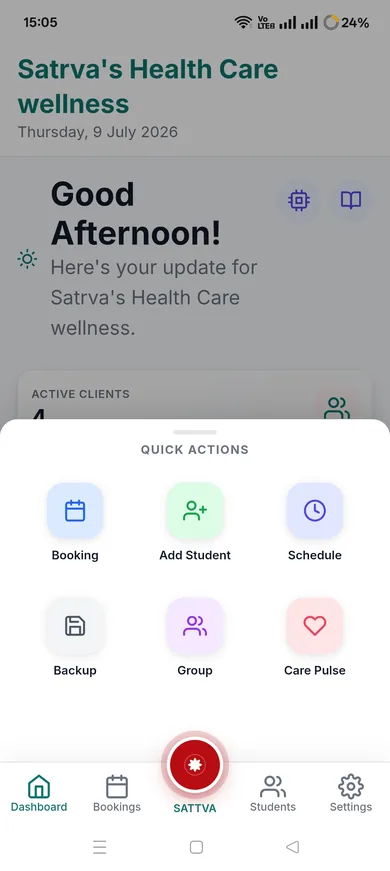
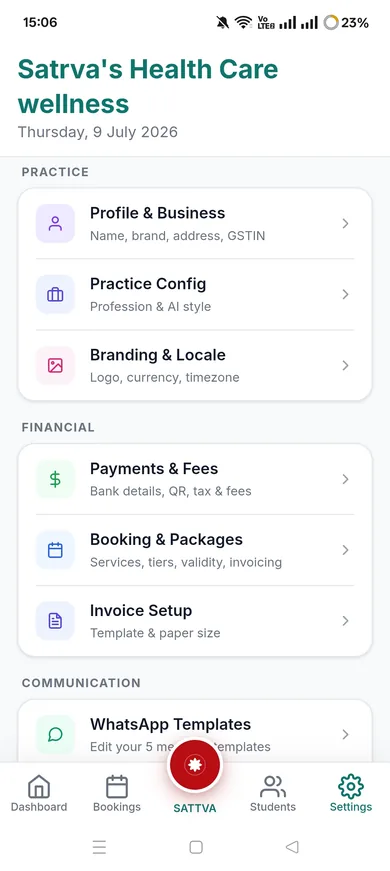
The app, not just the promise.
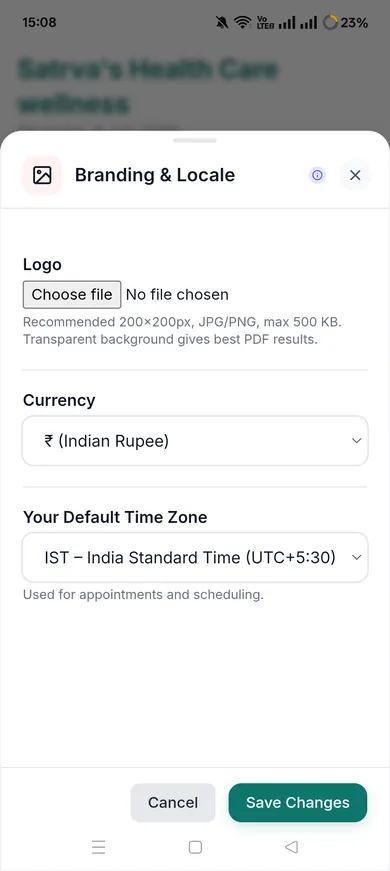
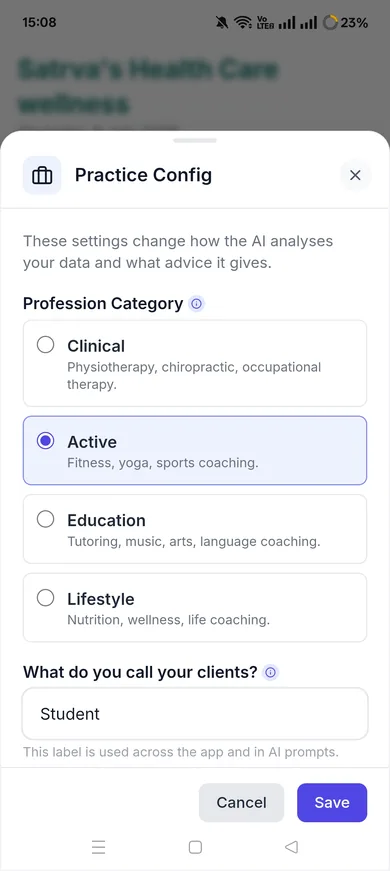
Every screen designed for how holistic practitioners actually work — clean, fast, and fully offline.
Built for India. Built for the real world.
Sattva is offline-first by architecture — not as a backup feature. Sporadic internet, rural clinics, wellness retreats, back-to-back sessions — Sattva runs perfectly without needing a connection. Your data syncs when you want it to.
Your practice runs. Whether the internet does or not.
Simple, honest pricing
Free for everyone right now, while Sattva builds its community. Own it forever with an optional one-time purchase.
Questions about Sattva.
Specific answers for practitioners evaluating Sattva. Full FAQ at /faq.
What happens if I lose my phone or it breaks?
Your practice data is safe if you have been taking regular encrypted backups. Export a backup from Settings → Backup, save it to Google Drive or your storage. When you get a new device, restore from the backup file — your entire practice history comes back. We strongly recommend weekly backups. If you had no backup, the data on the lost device cannot be recovered — not by you, not by us. This is the proof that our encryption is genuine.
Can I run Sattva on more than one device?
Yes, via Backup Location + Sync — point Sattva at a shared folder (your own Google Drive, Dropbox, or similar), and it backs up there automatically, tagged to the device it came from. On another device, tap Sync to pull in the newest backup. There is no live real-time sync since Sattva has no server — it is last-write-wins, so it works best when you are not editing on two devices at the exact same moment.
How do I move from my current practice management tool?
There is no automated import — client records, packages, and bookings need to be set up in Sattva directly. The setup wizard guides you through initial configuration. For large practices with hundreds of clients, contact us — depending on your current tool's export format, we may be able to assist with a data migration.
Does it work without internet for weeks at a time?
Yes. Sattva is offline-first by architecture — it was designed for practitioners in rural areas, wellness retreats, and back-to-back sessions where connectivity is unreliable. Every feature works without internet. There is no feature that degrades or breaks offline. The only thing requiring internet is AI features and sending WhatsApp messages (which opens your WhatsApp app).
When I use the AI feature, does it know who my client is?
No. AI features use a pseudonymisation layer — your content is tagged to a randomly generated anonymous session ID before it reaches any AI provider. The AI provider receives content and an ID; it has no way to know who the content belongs to. The mapping between that ID and your actual client exists only on your device. Additionally, you configure your own AI provider — Muladhara never sees your AI transactions.
What is the backup process exactly?
Go to Settings → Backup → Export. Sattva creates an AES-GCM encrypted file containing all your data. This file is useless without your PIN. Save it anywhere — Google Drive, email to yourself, USB. To restore: install Sattva on the new device, go to Restore, select the file, enter your PIN. Everything comes back exactly as you left it.
From practitioners who use it.
Their words are coming. Our first practitioners are building their practices on Sattva right now.
Their words are coming. Our first practitioners are building their practices on Sattva right now.
Their words are coming. Our first practitioners are building their practices on Sattva right now.
We launched recently. We believe testimonials should be earned, not invented. These placeholders will be replaced with real words from real practitioners — as honestly as everything else we build.
Running a studio chain or corporate wellness program?
Sattva is available as a fully white-labeled enterprise platform. Your brand, your app, your data. Any country. Any currency. Full source code ownership.
Explore Sattva Enterprise